To allow translation in paragraph content, go to admin/config/regional/content-language and check Paragraph
En el functions.php del tema activo añadir:
function mode_maintenance(){
if(!current_user_can('edit_themes') || !is_user_logged_in()){
wp_die('<div style="border:dotted 3px black;"><h1 style="color:#72d7ff; text-align:center; font-size:35px;">SITIO WEB EN MANTENIMIENTO</h1><p style="text-align:center; font-size:30px;">Estamos en construcción, pronto recibirás nuevas noticias...</p><center><img src="https://raiola.begoromero.com/wp-content/uploads/2018/10/logotipo-raiola.jpg"></center></div>', 'Sitio en Mantenimiento', array( ‘response’ => 503 ));
}
}
add_action('init', 'mode_maintenance');
Cuando llegas al límite de proyectos salta este error:
Lanzar comando: docker network prune
The command docker network prune can be used to remove all networks not used by at least one container.
Ver proyectos
docker network ls
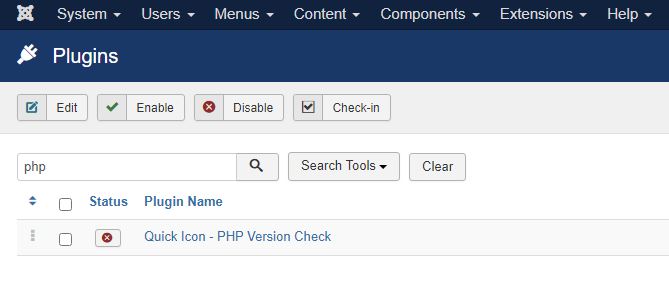
Error Joomla al iniciar sesión en el panel de administración en las páginas index.php
Cambiar versión PHP a 7.1 o 7.2 o 7.3
This error happens because of a plugin called plg_quickicon_phpversioncheck. Your Joomla! version is not recognizing the current version of PHP. You can update Joomla! to the latest version that supports up to PHP 8.0 or turn off the plugin that checks the php version.
To turn off the plugin:
1) Menu – Extensions > Plugins
2) Search for php.
3) Uncheck the “Quick Icon plugin – PHP Version Check”.

Crear archivo .php.ini y subir al hosting
;######DH_CONF_PHP_INI_BEGIN######
; Created by Dinahosting on [2021-11-24 14:53:28]
; Do not edit this content, will be overwritten by Dinahosting
session.gc_maxlifetime = 10000
max_input_vars = 10000
post_max_size = 100M
upload_max_filesize = 100M
session.cookie_lifetime = 10000
default_charset = UTF-8
;######DH_CONF_PHP_INI_END######
Usar los comandos de drush dentro de los proyectos de los subdominios de Dinahosting
En el GitLab de evelb se ha creado un grupo llamado "ADET" donde deberán estar los módulos, profiles y temas de ADET que se quieran utilizar desde composer en los diferentes proyectos.
Cada módulo/profile/tema debe ser un repositorio nuevo dentro de ese grupo ADET.
En cada repositorio se debe crear un tag inicial 1.0.0, que será el que se descargue. Con cada nueva versión se irán generando nuevos tags con las nuevas versiones por ejemplo: 1.1.0, 1.2.0, ...
Cada repositorio, debe tener en su raíz un fichero composer.json con la siguiente estructura:
{
"name": "adet/[nombre estructura]",
"description": "",
"type": "drupal-module",
"license": "GPL-2.0-or-later",
"authors": [
{
"name": "evelb",
"email": "web@evelb.es"
}
],
"repositories": [
],
"minimum-stability": "stable",
"require": {
}
}
Es importante que:
Listado de recomendaciones a tener en cuenta en: